> ## Documentation Index
> Fetch the complete documentation index at: https://dynamic-docs-feat-sidebar-revamp.mintlify.site/llms.txt
> Use this file to discover all available pages before exploring further.
# NFT/Token Gating
NFT/Token Gating is a feature of access control, just like access lists. It is a way of restricting access to those who have certain NFTs or tokens. For example, you can:
* restrict page access based on users NFTs or Tokens
* give user list of scopes based on users NFTs or Tokens
The feature works by defining what are called "gates". You can have multiple gates based on different contract addresses. Inside of a gate you can add multiple criteria which all needs to be fulfilled for gate to be applied. Remember that between different gates we are adding an `OR` statement. That allows you to create a complex logic based on `AND` and `OR` gates, as you'll see in the example section on this page!
### How to create a new gate?
Visit [the Access Control tab of the Dynamic dashboard](https://app.dynamic.xyz/dashboard/configurations#accesscontrol).
1. Click "Create new gate"
2. Set a name for your gate
3. Choose from two options:
1. Allow Site Access - users who fulfils the criteria won't be blocked from entering the site.
2. Return scope - users who fulfils the criteria will have a scope added to their `jwt` token.
4. Select chain on which you want to apply the gate. Right now we only allow adding gates for `Ethereum`, `Polygon`, `Optimism`, `Arbitrum`. If you need another, let us know!
5. Select the type of criteria for the gate:
6. Token - for token criteria you need to select a token you want for users to have and amount.
7. NFT - for NFT criteria you need to enter contract address of NFT you want for users to have.
8. Save and enable the toggle when you're ready.
9. Boom. You're done!
### Examples
**Block site for users without specific amount of tokens.**
Gate setup:
* User needs to have at least 1 SHIB to enter the site.
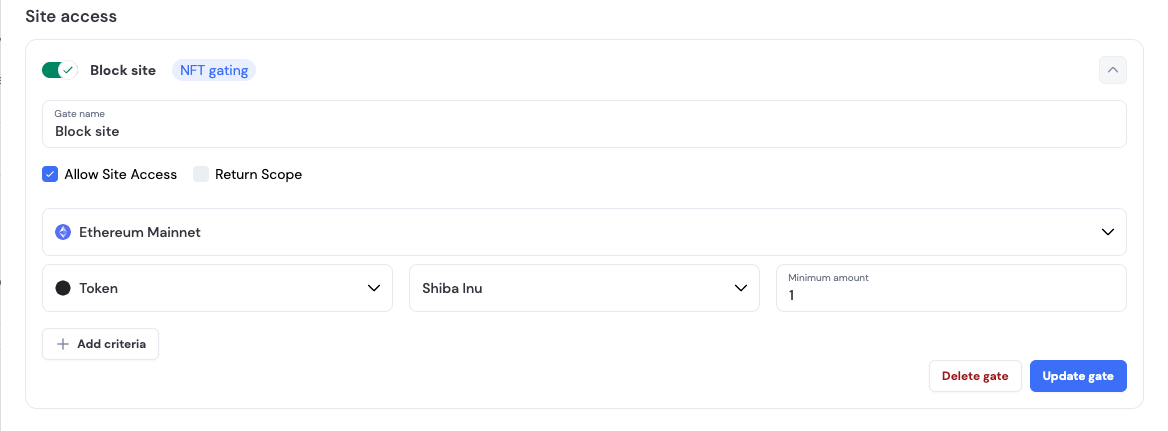 * User is blocked in Dynamic SDK:
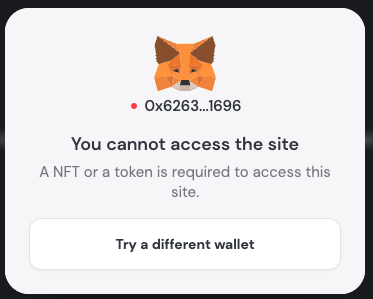 **Add scope for users `jwt` when having specific NFT**
Gate setup:
* User needs to have specific NFT to have `admin` scope
**Add scope for users `jwt` when having specific NFT**
Gate setup:
* User needs to have specific NFT to have `admin` scope
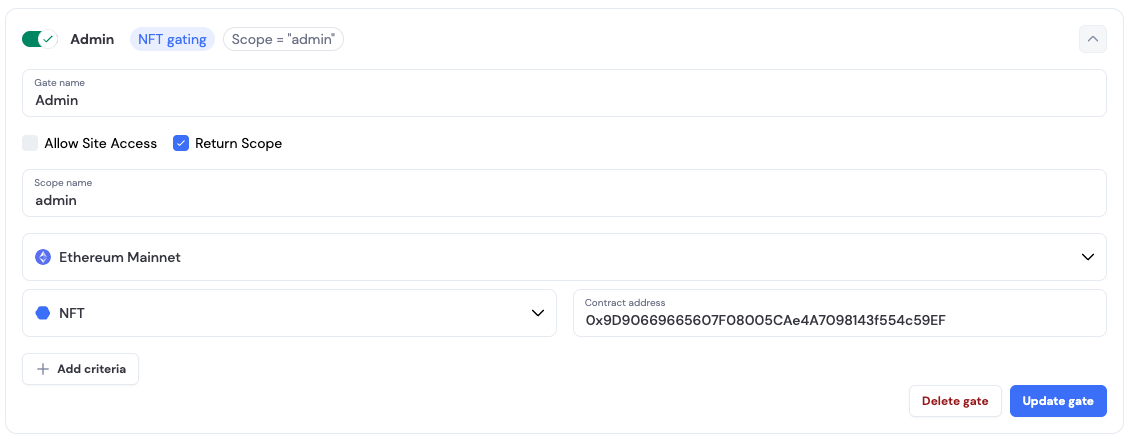 * User has an `admin` scope added to the `jwt`
```Text json
{
...
"scope": "admin",
...
}
```
### Working with scopes
To simplify working with scopes, we created a custom hook named `useDynamicScopes`. It allows checking for users scopes and checking if one or many of them are in users `jwt` token. Check the docs [here](/react-sdk/hooks/usedynamicscopes).
* User has an `admin` scope added to the `jwt`
```Text json
{
...
"scope": "admin",
...
}
```
### Working with scopes
To simplify working with scopes, we created a custom hook named `useDynamicScopes`. It allows checking for users scopes and checking if one or many of them are in users `jwt` token. Check the docs [here](/react-sdk/hooks/usedynamicscopes).